How to use Insights
Insights is a written summary of everything you've logged for your pet, with the patterns it found and ideas to try. You'll find it on your pet's Insights tab.
See your pet's insight
- Tap your pet on the main screen.
- Open the Insights tab.
- Tap a section to open it.
The dates under the tab show which days the insight covers.
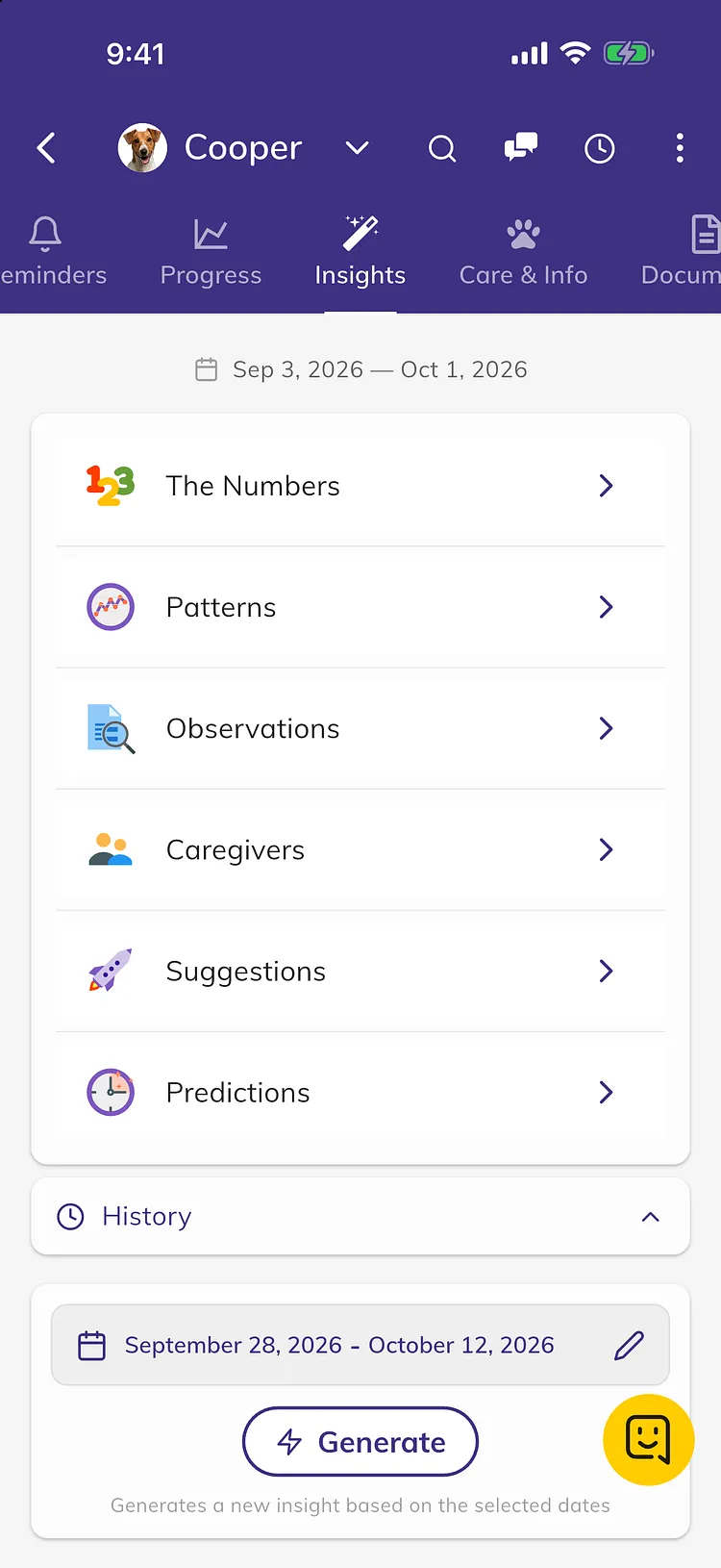
What's in an insight
- The Numbers lists how many times each activity was logged.
- Patterns describes your pet's daily rhythm, for example when meals, potty breaks or naps usually happen and how far apart.
- Observations points out what stands out and what changed since the last insight.
- Caregivers shows what each person on your account logged.
- Suggestions gives a few ideas to try, based on your log.
- Predictions lists what tends to happen next, with how sure it is, for example "tends to poop 30 to 45 minutes after meals".
A section only appears when there's enough data for it.
How insights are made
- Each insight is written by AI from the activities you logged over the last 30 days.
- A new insight is made automatically about once a day, once at least 5 new activities have been logged.
- Your first insight comes after a full day of logging.
- When a new automatic insight is ready, everyone with access to your pet gets a notification.
Get an insight for any dates
- Scroll down to the dates below History and tap them. It starts with the last 14 days.
- Choose a start and end date.
- Tap Generate.
When it's ready, Insights History opens with your new insight. Generated insights are only shown in history. The Insights tab always shows the latest automatic insight.
See past insights
- Tap History.
- Tap an insight to open it.
Each one is marked Automatic or Manual.
Rate an insight
Under the insight, tap a face, write a comment and tap Send. Your feedback helps us improve insights.
Premium
New insights, generating insights for any dates and the history are part of Premium. Without Premium, you get one free automatic insight for each pet once you've signed in and logged a few activities. Below it, tap Unlock Now to upgrade. See What's free and what's in Premium.
For a quick answer about your pet, you can also ask the Assistant. See How to use the Assistant.
Troubleshooting
- "Your insights are still processing or you need to log more activities. Please check back later." Keep logging. Your first insight comes after a full day of logging.
- "Tap here to sign in and start generating your pet's insights!" Tap the message and sign in. Insights need an account.
- My insight hasn't changed. A new automatic insight comes about once a day, and only after at least 5 new activities. Pull down on the Insights tab to check for a new one. An insight you made with Generate is in History, not on the tab.
- "An insight for this date range already exists. Check history to view it." You already made an insight for those dates. Open History, or choose different dates.
- "Log a few more activities to get insights." The dates you chose have fewer than 5 activities. Choose a longer range.
- "Date range must not exceed 186 days. Please select a shorter range." Choose a range of 186 days or less.
- "An error occurred while processing your insights. Please try again later." Check your internet connection and try again in a few minutes.